
Meta Just Gave You Some Control Back?

Meta has spent years pushing advertisers toward more automation. This new feature quietly hands some control back. Here's how Push Delivery to This Ad works, and when to actually use it.
A new lever, straight from Meta.
Anyone running multiple ads in one ad set has felt this before: you launch new creative, and Meta just... doesn't show it. The algorithm picks a favorite early and rides it, while everything else sits at zero impressions. Up until now, your only real fix was starting over with a new ad set or pausing the existing top performer.
That's changed. Recently, Meta rolled out a new feature called Push Delivery to This Ad, and it's exactly what it sounds like. We think it's a good addition, if you use it right.
What It Actually Does
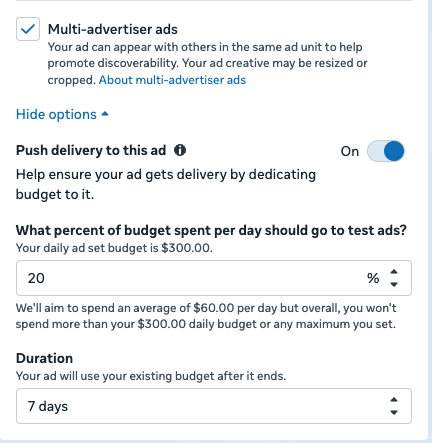
Push Delivery to This Ad lets you manually dedicate a percentage of your budget to one specific ad, for a set number of days. You'll find it in Ad Setup, under Multi-Advertiser Ads settings, but it only shows up once you have at least two ads in the ad set.
Here's how it works:
— You choose a percentage of your campaign or ad set budget to push toward one ad.
— The push can run anywhere from 1 to 30 days, even though Meta's default suggestion is 7.
— Once the push ends, the ad goes back to competing normally for delivery.
— It works on ads that are already live, not just new ones.
Meta started rolling this out in the spring of 2026, and by July, it was showing up across nearly every ad account.
Not the Same as Creative Testing
It's easy to mix this up with Meta's Creative Testing tool, but they solve different problems.
Creative Testing sets up an actual A/B test between multiple new ads and declares a winner based on the metric you choose:
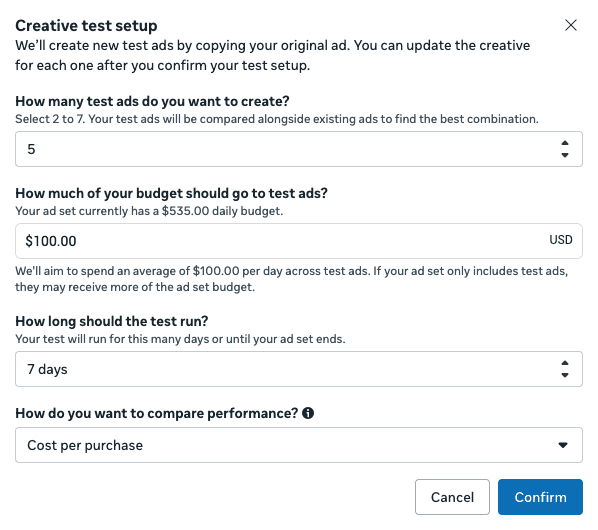
Push Delivery doesn't run a test at all. It simply forces spend toward one ad you've already chosen, whether that ad is brand new or already been running for months.
That second part is the real upgrade. Creative Testing only ever worked on ads you hadn't launched yet. Push Delivery removes that restriction entirely.
When It Earns Its Spot in Your Toolkit
Used well, this feature solves two specific problems:
An underperforming ad set. When an ad set is underperforming, and one ad clearly isn't getting a fair shot at delivery, a short push can tell you whether that ad simply needed exposure, or whether it was never going to perform.
Time-sensitive promotions. Launching a limited-time offer into an ad set with existing top performers is risky. Meta may never show your new promo ads before the window closes. Pushing delivery guarantees they get seen while the promotion is live, without pulling budget into a brand new campaign that has to earn trust with the algorithm all over again.
When to Leave It Alone
Here's the part worth taking seriously. This is not a tool for everyday use.
Meta's algorithm is generally good at finding what works, and manual overrides come with a cost when they're not solving a performance issue. Pushing delivery to every new ad you launch, just to be safe, will likely drive your costs up without fixing anything. Save this feature for underperforming ad sets that you believe could be improved by pushing delivery to a specific ad.
The Bottom Line
Push Delivery to This Ad gives advertisers something Meta has rarely offered: real manual control over ads in an already-running ad set, without having to duplicate anything. Used sparingly and with intention, it's a genuinely useful lever. Used as a habit, it's an easy way to drive up costs unnecessarily.
The hard part isn't the feature itself. It's knowing when your account actually needs it.